Normally, the AM trip and the PM trip under one route go through similar stops. In this case, you can create an AM/PM trip with reverse sequences by using the Create AM/PM trip function, which will create a PM trip from an AM trip while reversing the stop order or vice versa.
On the Routes Tab, use the three dots and the edit icon to open up the Route for which you'd like to create an AM or PM Trip.
Once the route is open, go to Operations - Create AM/PM Trips.
Select the trip you'd like to clone and determine if you'd like to reverse the sequence for non-school stops. Reversing the sequence means putting the last non-school stop first on the cloned trip.
Then, select the time using the clock selection tool.
Once you've made these selections, click Clone.
Below is the PM trip created by the function. Stops and assignments are kept well with reversing order.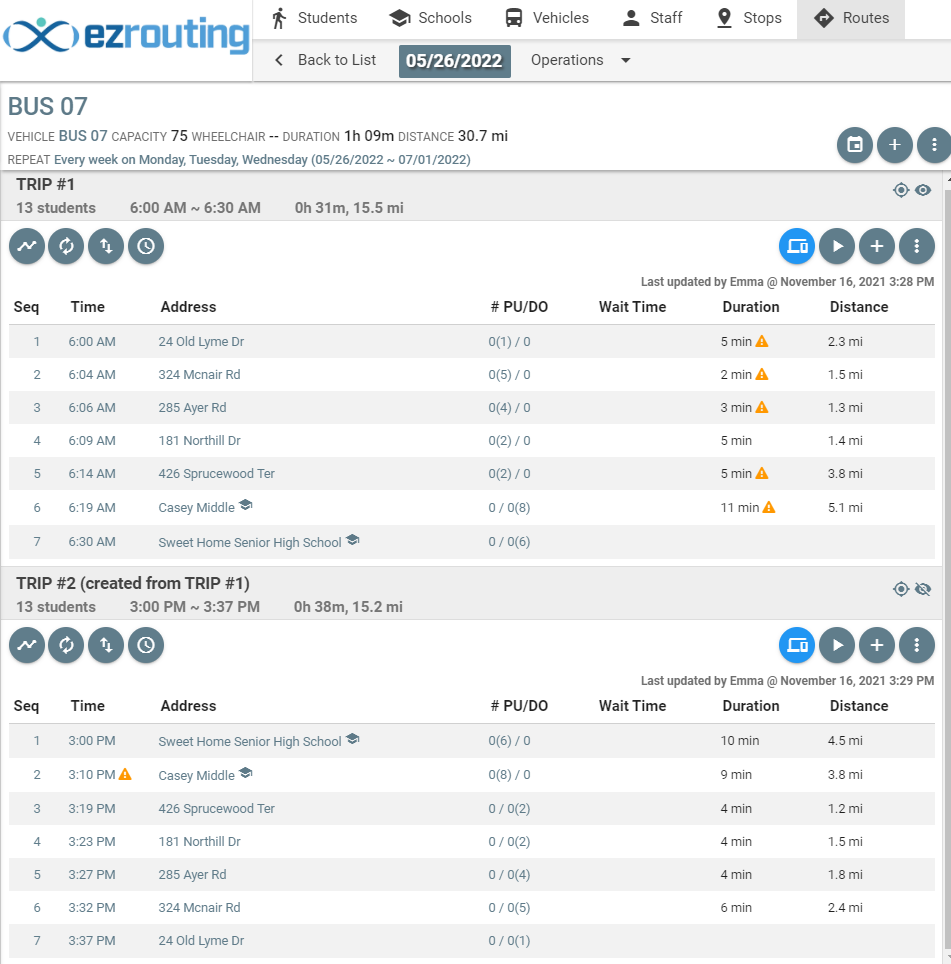
Updated